
You don’t need a computer science degree to build the next big app or automate your boring spreadsheet tasks. You just need the right programming tutorial is a structured guide designed to teach coding concepts through practical examples and step-by-step instructions. It serves as the primary entry point for millions of aspiring developers worldwide. In 2026, the barrier to entry has never been lower, but the noise has never been higher. There are thousands of videos, blogs, and courses promising "mastery in 30 days." Most of them fail because they focus on syntax rather than logic. This guide cuts through the hype. We will look at how to pick the right resources, avoid the common traps that kill motivation, and actually retain what you learn.
Why Tutorials Are Not Enough (The Trap)
Let’s address the elephant in the room: tutorial hell. You watch a video where an instructor builds a weather app. You follow along, typing every line. It works! You feel like a genius. Then you close the laptop and try to build something from scratch. Blank screen. Panic. Nothing happens.
This happens because passive consumption feels like progress but isn’t. Watching someone cook doesn’t make you a chef. Reading about swimming won’t keep you afloat. A coding curriculum is a planned sequence of learning modules that builds foundational knowledge before advancing to complex topics. Without structure, you’re just collecting snippets of code you don’t understand.
The goal of any good tutorial should be to give you enough context to break things on purpose. If you can’t modify the final project or explain why a specific function exists, you haven’t learned anything yet. You’ve just memorized keystrokes.
Picking Your First Language: Less Is More
New learners often ask, "What is the best programming language?" The answer depends entirely on what you want to build. Trying to learn everything at once is a recipe for burnout. Here is how to choose based on your goals:
| Goal | Recommended Language | Why It Works |
|---|---|---|
| Web Development | JavaScript is a versatile scripting language primarily used for adding interactivity to websites. | Runs in every browser. Huge ecosystem. Immediate visual feedback. |
| Data Analysis & AI | Python is a high-level general-purpose language known for its readability and extensive libraries for data science. | Simple syntax. Dominates the AI and machine learning sectors. |
| Mobile Apps (iOS) | Swift is Apple's proprietary programming language designed for iOS, macOS, watchOS, and tvOS development. | Optimized for Apple devices. Modern syntax reduces bugs. |
| Enterprise Systems | Java is an object-oriented programming language widely used in large-scale enterprise applications and Android development. | Strongly typed. Runs anywhere via the Java Virtual Machine (JVM). |
If you have no specific goal, start with Python or JavaScript. They offer the fastest path to seeing tangible results. Don’t worry about missing out on C++ or Rust yet. Those languages introduce memory management concepts that are great for understanding computers deeply, but terrible for keeping a beginner motivated when all you want to do is make a button change color.
Structuring Your Learning Path
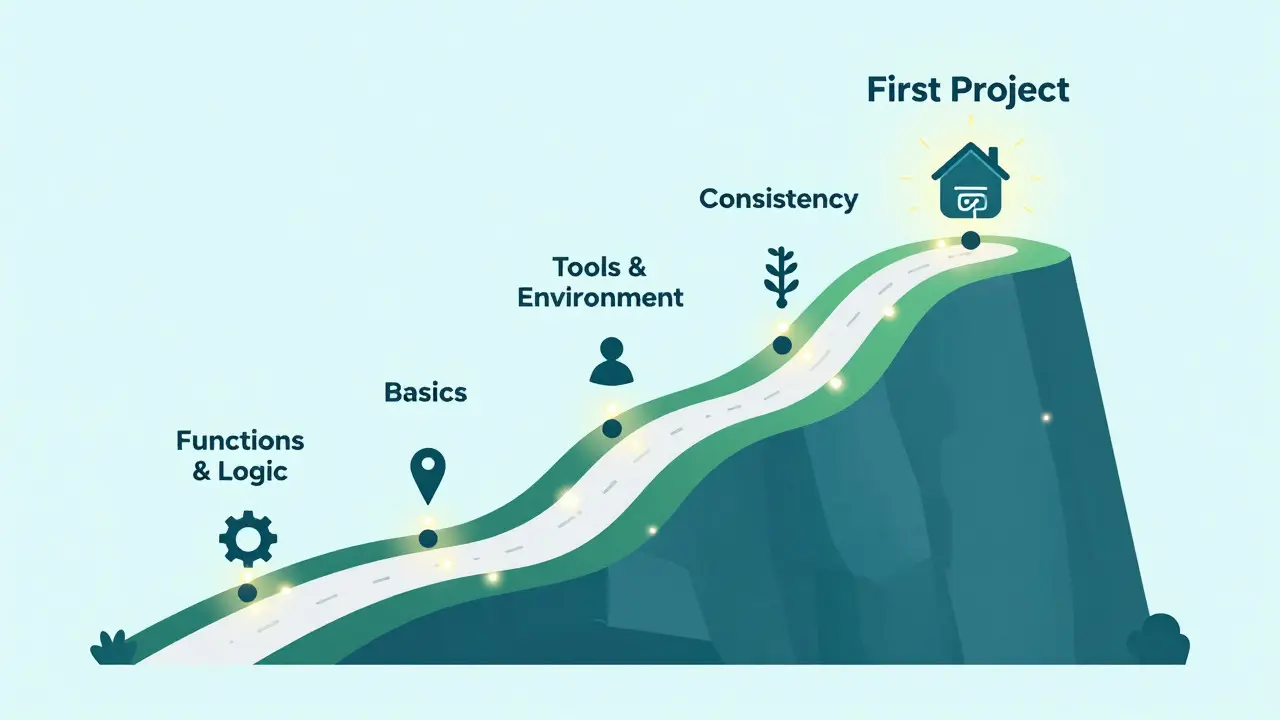
A random collection of YouTube videos is not a strategy. You need a roadmap. Think of learning to code like building a house. You don’t paint the walls before you pour the foundation.
- Basics (Weeks 1-4): Variables, data types, loops, and conditionals. These are the grammar of code. You cannot write a poem if you don’t know nouns and verbs.
- Functions & Logic (Weeks 5-8): Learn to break problems into smaller pieces. This is where most people quit because it requires abstract thinking, not just copying code.
- Tools & Environment (Weeks 9-12): Version control (Git), command line basics, and debugging. Code rarely works the first time. Knowing how to fix it is more valuable than knowing how to write it perfectly.
- First Project (Month 4+): Build something ugly but functional. A to-do list. A calculator. A personal portfolio site.
The key here is consistency over intensity. Coding for 30 minutes every day is infinitely better than cramming for eight hours on Sunday. Your brain needs sleep to consolidate procedural memory. If you skip days, you spend half your session remembering what you did last week instead of learning new things.
Active Recall: How to Actually Retain Knowledge
Most tutorials suffer from the "illusion of competence." You nod along because the instructor makes sense. But do you? Test yourself. Use the Feynman Technique: try to explain the concept you just learned in simple terms, as if teaching a ten-year-old. If you stumble, you don’t understand it yet.
Here is a practical exercise after every tutorial module:
- Break It: Delete a crucial part of the code. What error do you get? Why?
- Modify It: Change the output. If the tutorial prints "Hello World," make it print your name. If it calculates tax, make it calculate tips.
- Rebuild It: Close the tutorial. Open a blank file. Try to recreate the functionality from memory. Struggle is good. Struggle means learning is happening.
Documentation reading is also a skill. Tutorials hold your hand; documentation does not. Start reading the official docs for your chosen language early. For example, the MDN Web Docs is Mozilla's comprehensive resource for web technologies including HTML, CSS, and JavaScript. is considered the gold standard for web developers. Getting comfortable with dry, technical writing separates hobbyists from professionals.
Common Pitfalls to Avoid
I see these mistakes repeatedly in forums and communities. Recognizing them early saves months of frustration.
1. Copy-Pasting Without Understanding If you copy a block of code, read it line by line. Ask "what does this do?" If you can’t answer, pause and research that specific line. Blind copying creates fragile code that breaks the moment requirements change.
2. Ignoring Errors Error messages are not insults; they are clues. When your code crashes, the console tells you exactly which line failed and why. Learn to read stack traces. In 2026, AI assistants can help explain errors, but relying on them completely prevents you from developing diagnostic intuition.
3. Jumping Between Frameworks Don’t start a React tutorial, then switch to Vue, then try Angular. Frameworks come and go. Core concepts like state management, component architecture, and event handling remain similar. Master the fundamentals in one environment before exploring others.
Building a Portfolio That Gets Noticed
Certificates prove you watched a video. Projects prove you can solve problems. Employers and clients care about the latter. Your portfolio should showcase three types of projects:
- The Clone: Recreate a simple version of a popular app (e.g., Twitter, Spotify). This shows you understand existing patterns.
- The Utility: Build a tool that solves a personal problem. Maybe a script that organizes your downloads folder or a budget tracker. This shows practical application.
- The Experiment: Try something risky. Use a new library, integrate an API you’ve never seen, or attempt a game. This shows curiosity and resilience.
Host your code on GitHub is a web-based platform for version control and collaboration using Git, widely used by software developers.. Write clear README files. Explain what the project does, how to run it, and what you learned. Bad documentation is a red flag for hiring managers.
The Role of Community and Mentorship
Coding can be isolating. Debugging alone at 2 AM feels lonely. Join communities. Discord servers, Reddit threads (like r/learnprogramming), and local meetups provide support. Asking for help is a skill. Before posting a question, show what you’ve tried. Provide minimal reproducible examples. People love helping those who demonstrate effort.
Find a mentor if possible. It doesn’t have to be formal. A senior developer reviewing your code once a month can accelerate your growth significantly. They spot bad habits before they become ingrained.
Next Steps: From Tutorial to Professional
Once you’ve built a few projects and feel comfortable with the basics, shift your focus. Stop looking for "beginner" tutorials. Start looking for "intermediate" challenges. Contribute to open-source projects. Fix typos in documentation. Resolve small bugs. Real-world codebases are messy, large, and collaborative. Adapting to that environment is the final hurdle.
Digital dominance isn’t about knowing every language. It’s about the ability to learn quickly, solve problems logically, and persist when things break. The tutorial is just the door. You have to walk through it.
How long does it take to learn programming from scratch?
It depends on your definition of "learn." To build simple projects, expect 3-6 months of consistent daily practice (1-2 hours/day). To reach job-ready proficiency for entry-level roles, plan for 12-18 months. Mastery is a lifelong journey. Consistency matters more than speed.
Is free content enough to learn coding?
Yes, absolutely. Free resources like freeCodeCamp, The Odin Project, and official documentation are excellent. Paid courses offer structure and accountability, which some people need. However, expensive bootcamps do not guarantee jobs. Your portfolio and problem-solving skills matter more than the price tag of your education.
Do I need math skills to become a programmer?
For most web development and general software engineering, basic algebra and logical reasoning are sufficient. Advanced fields like machine learning, graphics programming, or cryptography require stronger mathematical backgrounds. Don’t let math anxiety stop you from starting; you can always specialize later.
What is the best way to debug code?
Use a debugger tool in your IDE to step through code line-by-line and inspect variable states. Print statements are okay for quick checks, but debuggers are superior. Also, try "rubber duck debugging": explain your code line-by-line to an inanimate object. Often, speaking the logic aloud reveals the flaw.
Should I learn multiple programming languages at once?
No. Focus on one language until you are comfortable with core concepts (loops, functions, data structures). Switching languages too early leads to confusion between syntax differences rather than conceptual understanding. Once you master one, learning others becomes much faster due to transferable logic.