

Quick Takeaways
- Use guard clauses to kill nested if-statements.
- Leverage map, filter, and reduce for cleaner data transformations.
- Apply the DRY principle to stop repeating yourself.
- Optimize loops by moving static calculations outside.
- Master the art of descriptive naming to eliminate the need for comments.
Stop the Nesting Nightmare with Guard Clauses
We have all seen the "Pyramid of Doom." It happens when you nest if-statements so deeply that your code starts drifting toward the right side of the screen. This makes the logic hard to follow because the reader has to keep a mental stack of five different conditions just to understand the core action.
The fix is the guard clause. Instead of wrapping your entire logic in a giant if-block, check for the invalid conditions first and exit the function immediately. Think of it as a bouncer at a club: if you aren't on the list, you don't even get through the door. This keeps the "happy path" of your code aligned to the left margin, making it significantly easier to scan.
For example, if you are validating a user profile, don't do this: if (user) { if (user.isActive) { if (user.hasPermission) { // do work } } }. Instead, try: if (!user) return; if (!user.isActive) return; if (!user.hasPermission) return; // do work. It is punchy, direct, and removes the cognitive load.
Leveraging Functional Powerhouse Methods
Many beginners stick to for loops for everything. While they work, they are imperative and noisy. You have to manage the loop counter, the array length, and the incrementor. Modern
JavaScript is
a high-level, just-in-time compiled language that enables complex platform features
and offers much better ways to handle lists.
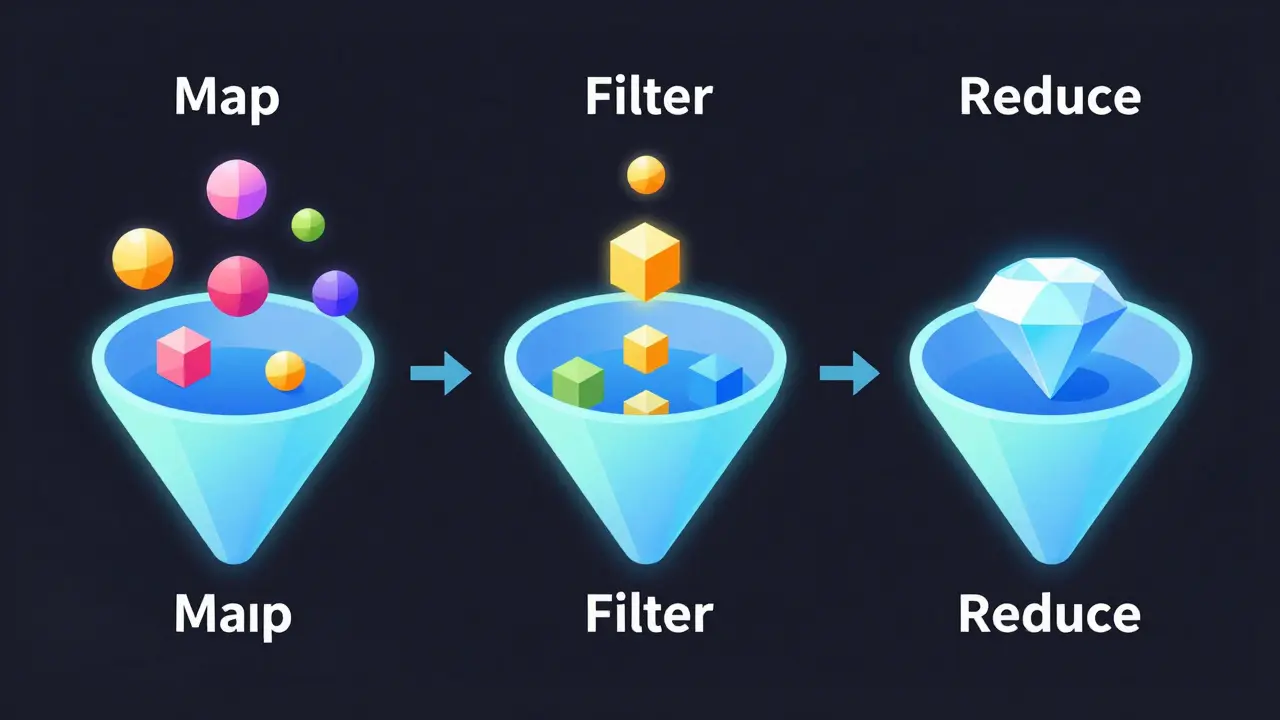
Enter the trio of Map, Filter, and Reduce. These are declarative methods. Instead of telling the computer how to loop, you tell it what you want. Use Map when you need to transform every item in a list. Use Filter to strip out the noise. Use Reduce when you need to boil a whole array down to a single value, like a total price or a combined string.
| Method | Goal | Returns | Example Use Case |
|---|---|---|---|
| Map | Transformation | New Array | Converting prices to include tax |
| Filter | Selection | New Array | Finding all users over age 18 |
| Reduce | Aggregation | Single Value | Summing up a shopping cart total |
Writing Code That Explains Itself
There is a common myth that great developers write extensive comments to explain their logic. In reality, the best code is self-documenting. If you need a comment to explain what a variable does, your variable name is probably the problem. A comment is often a confession that the code isn't clear enough.
Avoid generic names like data, item, or val. These are meaningless. Instead, use intention-revealing names. Instead of let d = 86400; // seconds in a day, use const SECONDS_IN_A_DAY = 86400;. Now, anyone reading the code knows exactly what that number represents without needing a translation guide.
This extends to boolean variables too. Instead of let check = true;, use let isUserAuthenticated = true; or let hasPaidSubscription = true;. When you read these in an if-statement, it reads like a sentence in English: if (hasPaidSubscription). That is how you build a codebase that survives developer turnover.
The Art of Avoiding Redundancy
The DRY Principle is a software development principle aimed at reducing repetition of software patterns which stands for "Don't Repeat Yourself." It is easy to fall into the trap of copy-pasting a block of code three times because it is faster in the moment. But the second you need to change a logic rule, you have to find and update all three instances. If you miss one, you've just introduced a bug.
The trick is to identify the common pattern and extract it into a reusable function. If you are formatting dates in five different places in your app, create a DateFormatter utility. This creates a single source of truth. When the client decides they want dates displayed as "DD/MM/YYYY" instead of "MM/DD/YYYY," you change one line of code in one file, and the entire application updates instantly.
Performance Wins: The Little Things That Matter
You don't always need a fancy algorithm to speed up your app. Often, the biggest bottlenecks come from simple mistakes in how we handle loops. A classic blunder is calculating a value inside a loop that never changes. For instance, if you are looping through 10,000 items and calling array.length or a complex mathematical function in the condition check every single time, you are wasting CPU cycles.
Move those static calculations outside. Cache the length of the array in a variable before the loop starts. While modern compilers are getting better at optimizing this, doing it manually ensures consistency across different environments. Similarly, use
Short-circuit Evaluation, which
is a logic operation where the second argument is executed only if the first is true (or false for OR)
to avoid unnecessary function calls. Instead of if (isValid() && doSomething()), the doSomething() function will only ever fire if isValid() returns true. This prevents the program from executing heavy logic when it's not needed.

Managing State and Side Effects
One of the hardest things to debug is a "mystery variable" that changes value in three different files. This is the danger of global state. When your application grows, relying on global variables leads to a nightmare where one function accidentally breaks another unrelated feature.
The professional approach is to embrace Pure Functions. A pure function is one that always produces the same output for the same input and has no side effects. It doesn't modify a global variable, it doesn't write to a database, and it doesn't change the original array passed to it. It simply takes data in and spits new data out.
By keeping your core logic pure, you make your code incredibly easy to test. You don't have to set up a whole database state just to check if a discount calculator works; you just pass in a number and check the result. This isolation is the key to scaling a project from a hobby script to an enterprise application.
Does using Map and Filter make code slower than a traditional for loop?
In most real-world scenarios, the performance difference is negligible. While a raw for loop can be slightly faster in micro-benchmarks, the gain in readability and maintainability far outweighs the few milliseconds saved. Unless you are processing millions of records in a high-frequency trading app or a game engine, prioritize clarity over micro-optimizations.
When should I NOT use the DRY principle?
There is a danger called "Over-abstraction." If you force two pieces of code into one shared function when they only happen to look the same but represent different business concepts, you create a fragile dependency. If they change for different reasons in the future, your shared function will become a mess of if-statements. Sometimes, a little bit of duplication is better than a wrong abstraction.
Are guard clauses supported in all programming languages?
Yes, guard clauses are a logic pattern, not a language feature. Whether you are using Python, Java, C#, or Ruby, the ability to return early from a function exists. It is a matter of coding style rather than syntax.
How do I start practicing these tricks in a large existing project?
Do not try to rewrite the whole codebase at once. Use the "Boy Scout Rule": always leave the code slightly cleaner than you found it. When you open a file to fix a bug or add a feature, apply a guard clause to one nested block or rename two vague variables. Over time, the quality of the project will rise without risking a massive regression.
What is the best way to identify which parts of my code need optimization?
Never guess where the slowness is. Use a profiling tool to find the actual bottlenecks. Most modern IDEs have built-in profilers that show you exactly which function is taking the most time and memory. Fix the 20% of the code that causes 80% of the lag.
What to Do Next
If you are feeling overwhelmed, start with the Guard Clause. It is the easiest trick to implement and provides an immediate visual improvement to your files. Once you are comfortable with that, move on to functional methods like Map and Filter to clean up your data handling.
If you find yourself struggling with state management, try converting one complex function into a pure function. Notice how much easier it is to write a unit test for it. The goal isn't to be a perfect coder overnight, but to incrementally remove the friction from your development process.